Google Search Console (GSC) is the only tool that reports Google’s own view of your site: what it crawled, what it indexed, what it refused to index, and what it showed to searchers. No third-party tool has that data. It is free, and it is the foundation of every technical SEO audit worth running.
But GSC in 2026 is not the GSC most guides describe. Google has retired several reports over the past two years, added a dedicated generative-AI visibility report in June 2026, and spent nearly a year quietly over-reporting impressions. If your understanding of GSC was formed before 2025, parts of it are now wrong.
This guide covers every report currently in the product, what each one tells you, and the specific action to take from each.
What Changed in Google Search Console (2023–2026)
Start here, because several widely-repeated pieces of GSC advice are now obsolete.
| Change | Date | What it means for you |
|---|---|---|
| Mobile Usability report, Mobile-Friendly Test and API retired | December 2023 | The report is gone. We covered this when it happened in the retirement of Google’s Mobile Usability report. |
| Page Experience and Sitelinks Search Box reports removed | November 2024 | Core Web Vitals and HTTPS remain as separate reports. |
| 24-hour Performance view launched | December 2024 | Hourly data with a few hours’ delay instead of ~48 hours. |
| AI Mode data merged into “Web” search type | June 2025 | Folded into your normal totals with no filter — until June 2026. |
| Impressions logging bug | May 2025 – April 2026 | Impressions were inflated for ~50 weeks. See the warning below. |
| &num=100 parameter removed | September 2025 | Scraper-driven impressions vanished. We wrote this up in why GSC impressions dropped in September 2025. |
| Six niche rich-result types removed | September 2025 | Check whether an Enhancements report quietly disappeared. |
| Weekly and monthly aggregation added | December 2025 | Easier period reporting without manual roll-ups. |
| FAQ rich results deprecated | May 2026 | Full detail in Google deprecates FAQ rich results. |
| Generative AI performance report launched | June 2026 | Dedicated AI Overviews, AI Mode and Discover AI visibility. |
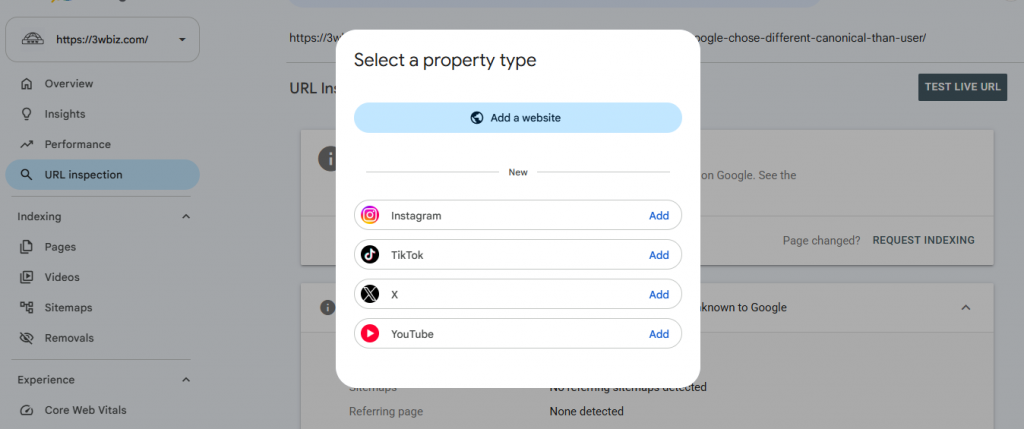
| Social Media Property | 7 July 2026 | Social accounts inside Google Search Console |
⚠️ Read this before you trust any impression number
Google confirmed on 3 April 2026 that a logging error caused Search Console to over-report impressions from 13 May 2025 through 27 April 2026. Clicks were not affected.
Three consequences that matter:
- Google did not backfill the bad data. The inflated figures remain in your account permanently.
- Year-over-year impression comparisons are unreliable until roughly May 2027, because you will be comparing corrected data against inflated data.
- Every CTR figure from that window is wrong — inflated denominator, correct numerator. Only use post-April-2026 data for CTR work.
Use GSC’s custom chart annotations to mark 13 May 2025, 12 September 2025, and 27 April 2026. If you report to clients, explain the drop before someone reads it as a traffic collapse. If you are already staring at a decline and are not sure which cause applies, work through why did my website traffic drop before assuming an algorithm hit.
Getting Started: Setting Up Your Property
If your site is not yet in GSC, work through our step-by-step Search Console setup guide first — it takes under ten minutes.
One decision worth getting right:
Choose a Domain property over a URL-prefix property wherever you can. A Domain property (verified via DNS TXT record) covers every subdomain plus both http and https in one view. A URL-prefix property covers only the exact protocol and subdomain you entered, so https://example.com and https://www.example.com report separately — a common cause of “my traffic looks half what it should be.”
Once verified, the sidebar organises everything into: Overview, Performance, URL Inspection, Indexing, Experience, Enhancements, Security & Manual Actions, Links, and Settings.
1. Performance (Search Results)
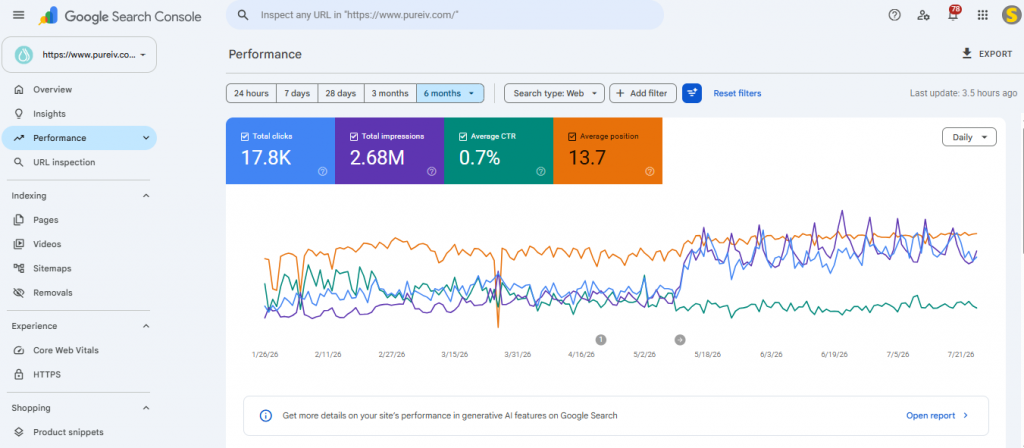
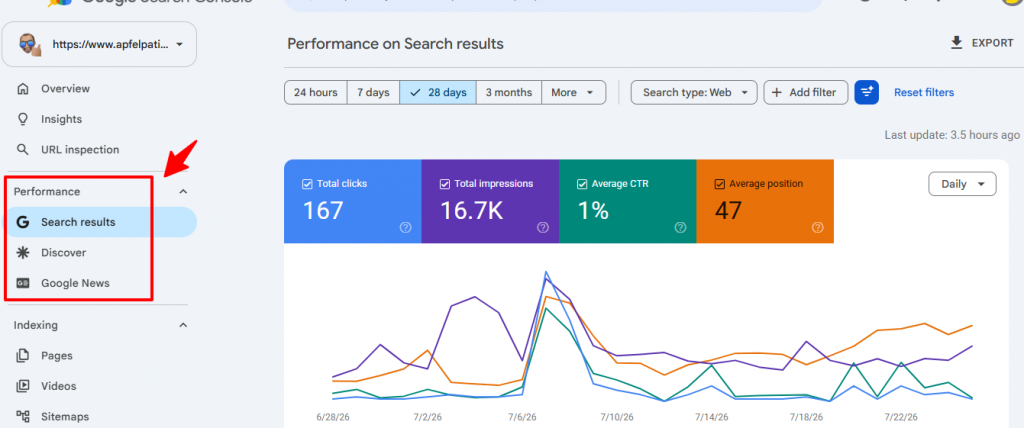
The Performance report shows which queries and pages earn impressions and clicks. It is where most SEOs spend most of their time, and rightly so.
The four metrics
Clicks — how many times a user clicked through from Google. Your most reliable metric, and the one unaffected by the 2025–26 bug.
Impressions — how many times a URL appeared in results, whether or not the user scrolled to it. Treat pre-May-2026 impressions with the caution above.
Average CTR — clicks divided by impressions. Directionally useful, but CTR falls naturally as AI Overviews absorb more clicks. A declining CTR is not automatically a title-tag problem.
Average position — the impression-weighted mean across all queries. Useful for trends, misleading as an absolute number: one query ranking at position 90 with huge impressions will drag the average down regardless of what your money pages do.
Search types you are probably ignoring
The Search type filter defaults to Web. Three others carry real data: Image (significant for eCommerce and recipe sites — see how to name images for SEO), Video, and News.
Separately, Discover and Google News appear as their own sidebar reports when your site qualifies. Discover traffic is volatile and driven by different signals, so analyse it separately rather than folding it into an organic total. If you publish news, our notes on SEO for news websites cover the specifics.
How to actually use the Performance report
Find your strike-zone pages. Filter to positions 8–20. These pages already rank; they need a push, not a rebuild. Add filter → Position → greater than 8, then → less than 20, and sort by impressions. Content refreshes here return more per hour than almost any other SEO work. Pair this with what to do after keyword research to decide what actually goes into the refresh.
Find high-impression, low-CTR queries. Filter for high impressions, then sort CTR ascending. A query with 5,000 impressions and 0.8% CTR usually means your title tag does not match the intent behind the query. Rewriting titles, descriptions and header tags is the fastest fix available, and it is core on-page SEO work.
Use regex filters. In any Query or Page filter, switch match type to “Custom (regex)”. The single most under-used feature in GSC:
- ^(who|what|when|where|why|how)\b — isolate question queries
- \b(buy|price|cost|cheap|discount)\b — isolate commercial intent
- Your brand name with “Doesn’t match” — strip branded traffic to see true non-brand performance
Compare date ranges, then switch to the Pages tab. The comparison view on Pages tells you exactly which URLs gained and lost clicks. This is the fastest diagnosis of a drop: concentrated loss means a page-level problem, spread loss means a site-level or algorithmic one. If it looks algorithmic, move to Google core update recovery or the full lost rankings playbook.
Platform-specific drops usually have platform-specific causes. We have separate diagnostics for WordPress, WooCommerce, Shopify, and eCommerce sites generally.
Use the 24-hour view for new content. Hourly data with only a few hours’ delay, and it exports. Publish an article, check it the same evening, and you know whether Google picked it up.
Export properly. The UI caps at 1,000 rows. For anything larger, use the API — our walkthrough on configuring the Google Search Console API covers setup — or the free Bulk Data Export to BigQuery under Settings.
2. AI Mode, AI Overviews, and the Generative AI Report
This is the biggest change to Search Console since the Coverage report was rebuilt, and the section most GSC guides still do not cover.
First, understand what you are measuring
AI Overviews are generated summaries appearing automatically above the blue links for certain informational queries. The user did not ask for them. We break down the ranking implications in what AI Overviews mean for modern SEO and the tactical side in the AI Overviews optimisation guide.
AI Mode is a separate tab the user chooses to enter. It behaves like a conversational assistant: longer queries, follow-ups, and a synthesised answer with citations rather than ten ranked results.
Both matter for the same reason: appearing inside the answer is replacing appearing at position one.
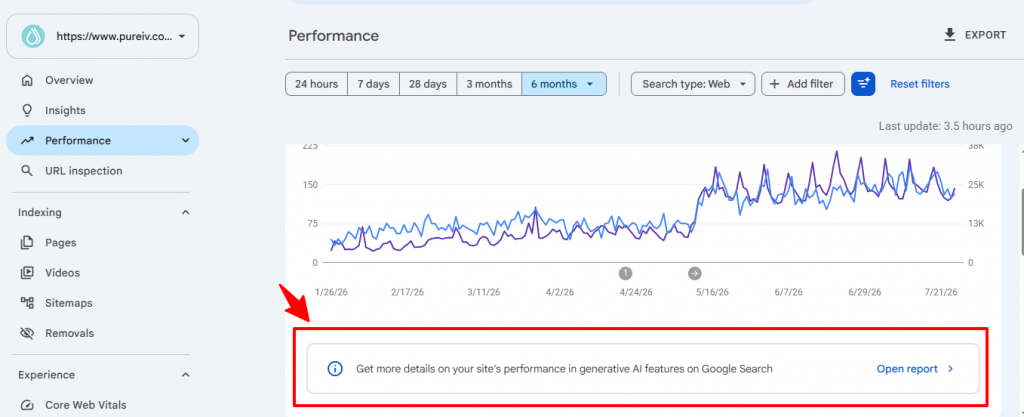
Query fan-out: why rankings and AI visibility diverge
The mechanism behind AI Mode is what Google calls query fan-out. Instead of matching your page to the typed query, the system breaks that query into concurrent sub-queries, runs them in parallel, retrieves passages from many sources, and synthesises one answer.
Google’s own example: “fix lawn weeds” expands into parallel searches like “best herbicides,” “remove weeds without chemicals,” and “prevent weeds” — each pulling a different passage from a different page.
Three practical consequences:
- Your page can be cited for queries it was never written for, provided it covers the surrounding sub-questions with real depth.
- A page targeting exactly one keyword is easy to skip. It answers the visible query and none of the hidden ones, so it loses the retrieval step even when it ranks well.
- Authority is evaluated across a topic cluster, not a single URL. Sites with genuine topical coverage — and a deliberate internal linking structure — get pulled more often.
What Google actually says to do about it
Google published an official AI optimisation guide in May 2026. Two points in it contradict a lot of circulating advice:
- There is no special schema for AI Mode or AI Overviews. Structured data still earns rich results, but no markup makes you eligible for AI citation. Anyone selling “AI schema” is selling nothing.
- Generative features run on the same core ranking and quality systems as classic Search. Eligibility comes first: indexable, snippet-eligible, internally linked, readable in the visible HTML. This is why technical SEO fundamentals still decide the outcome.
Google also cautions against the obvious over-correction — spinning up a separate URL for every fan-out variation. That produces overlapping pages competing for the same intent. Cover the sub-questions as sections within one strong resource.
Checking your AI eligibility before you rewrite anything
Run these in order. Most “AI visibility” problems are eligibility problems.
- URL Inspection → is the page indexed? Nothing uncited beats nothing indexed.
- Check for nosnippet, max-snippet:0, or data-nosnippet. If Google cannot take a snippet, it cannot ground an answer in your content.
- Render check → view the rendered HTML in URL Inspection. If your answer only exists after a JavaScript fetch, retrieval may miss it.
- Robots.txt → confirm you have not accidentally blocked crawling. Our fix guide for blocked by robots.txt covers the common mistakes.
- Internal links → orphaned pages rarely get retrieved. Ahrefs flags these as canonical URL has no incoming internal links.
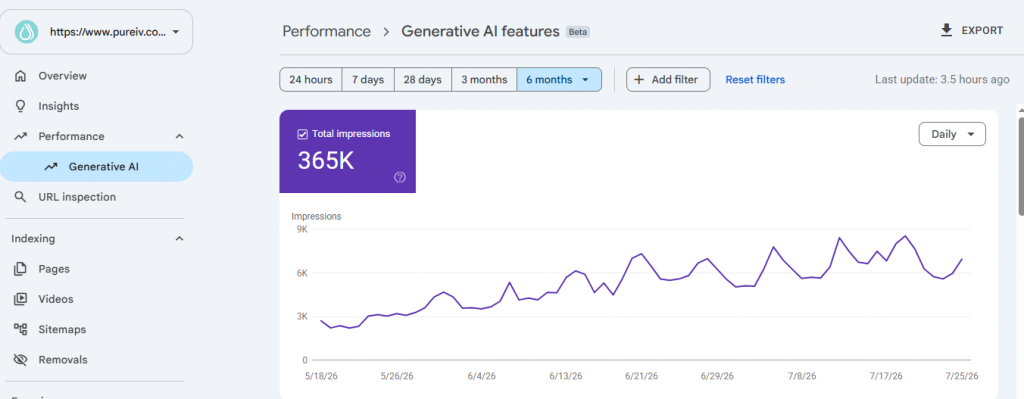
The Generative AI performance report
Launched June 2026, this is the first dedicated view of how your pages appear inside AI Overviews, AI Mode, and Discover’s AI features.
What it shows: impressions, pages, countries, devices (Search only), and dates from hourly through monthly.
What it does not show yet: clicks, CTR, or query data. You can see that you were surfaced. You cannot see what was asked, or whether anyone clicked.
Two things people get wrong:
This is not new traffic. These impressions were always counted in your totals. Google simply split them into their own view.
The absence of a filter before June 2026 was real. From June 2025, AI Mode clicks, impressions and position merged into the “Web” search type with no way to separate them. Any analysis in that window treating “Web” as pure classic organic was wrong, and it cannot be split retroactively. Note it in any year-over-year report covering that period.
The report is rolling out to a subset of properties first. If you do not have it yet, that is expected, not a configuration problem.
The opt-out toggle
The rollout includes a control to block your content from AI Overviews, AI Mode, and Discover’s AI features. Understand the trade first: opting out forfeits AI impressions and any traffic they generate, but does not affect your classic Search ranking.
For most sites this is the wrong lever. Consider it only where being summarised destroys the business model — paywalled publishers, subscription research. For everyone else, being excluded from the surface where answers increasingly happen is not a defensive move.
How to actually use the report
Find your cited pages and reverse-engineer them. The pages Google’s systems retrieve most tend to share traits: a direct answer within the first hundred words, specific numbers and dates rather than hedged generalities, headings that map to real sub-questions, and original data that cannot be found on ten other pages. Our notes on creating valuable content apply directly.
Compare AI impressions against classic impressions per page. High AI impressions with flat clicks means the page is source material that does not earn the visit. That is a reason to give the page something a summary cannot deliver: a tool, a calculator, a template, a dataset.
Cross-reference with Bing Webmaster Tools and GA4. Since the report lacks clicks, triangulate.
Do not build a separate “AI strategy.” The honest summary of Google’s guidance is that AI Mode optimisation is classic SEO with the vagueness removed. If a tactic makes your site clearer and more trustworthy, do it. If it exists only because someone renamed an old hack with “AI” in front of it, skip it.
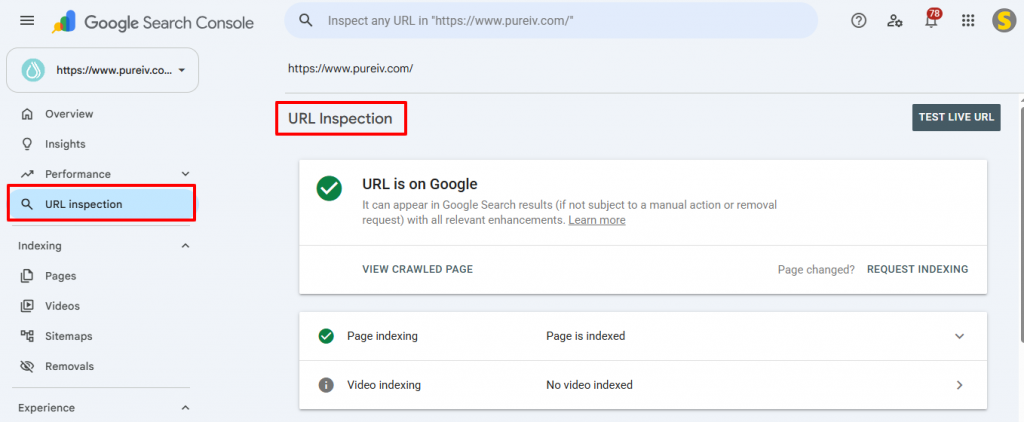
3. URL Inspection Tool
The most under-used feature in GSC. Paste any URL from your property and Google tells you what it knows about that page:
- Whether it is indexed, and if not, why
- When it was last crawled, and by which user-agent
- Which URL Google considers canonical — frequently different from your declared canonical, a silent and common problem worth understanding via our canonical tags guide
- Whether structured data is valid
- What Googlebot saw: rendered HTML, screenshot, and page-load errors
Live Test vs indexed version. The default view shows the indexed version — what Google stored. Click “Test Live URL” to fetch the page as it exists now. Comparing the two confirms a fix worked: the live test passes while the indexed version still shows the old error, meaning the fix is in and you are waiting on a recrawl.
Request Indexing. After publishing or significantly updating a page, request indexing to enter a priority crawl queue. Two caveats: it requests a crawl, not indexing, and there is a daily quota per property. Requesting repeatedly on the same URL does nothing.
4. Indexing Reports
Pages report (formerly Coverage)
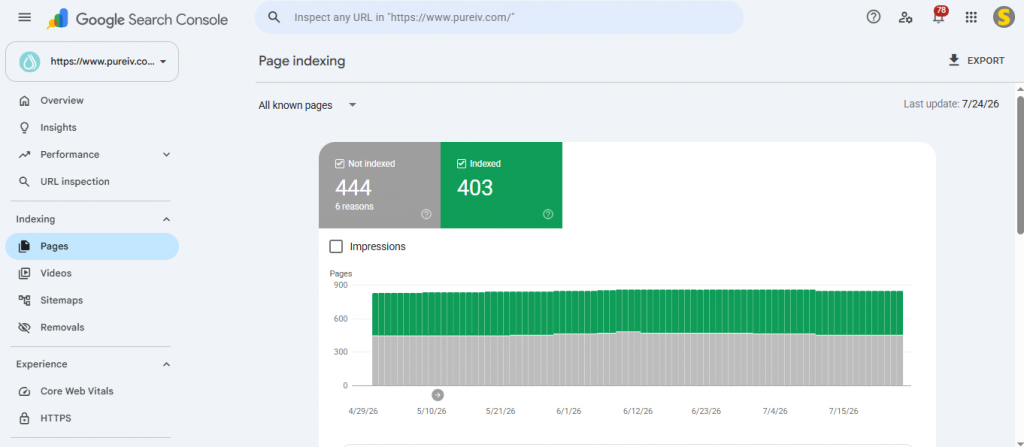
Shows the index status of every URL Google has discovered. Two buckets: Indexed and Not indexed. Our Google Search Console errors hub has a fix guide for each status below.
| Status | What it means | What to do |
|---|---|---|
| Crawled — currently not indexed | Crawled, then judged not worth indexing. Usually quality or duplication. | Add depth and original evidence. Full fix guide |
| Discovered — currently not indexed | Known but not yet crawled. Usually crawl budget or internal linking. | Fix guide, plus crawl budget management |
| Duplicate without user-selected canonical | Duplicates found; Google picked one itself. | Fix guide |
| Duplicate, Google chose different canonical | You declared one; Google overrode it. | Fix guide |
| Alternate page with proper canonical tag | Working as intended. | Why this is usually fine |
| Blocked by robots.txt | Crawling disallowed. | Fix robots.txt |
| Excluded by ‘noindex’ tag | A noindex directive is present. | Fix guide |
| Soft 404 | Returns 200 but looks empty to Google. | Fix guide |
| Not found (404) | Page returns 404. | Fix or redirect |
| Page with redirect | URL redirects elsewhere. | When to investigate |
| Redirect error | Chain, loop, or bad redirect. | Fix guide |
| Server error (5xx) | Server failed during crawl. | Fix guide |
| Blocked due to unauthorized request (401) | Auth wall blocking Googlebot. | Fix guide |
| Blocked due to access forbidden (403) | Permissions or firewall blocking Googlebot. | Fix guide |
| Blocked due to other 4xx issue | Miscellaneous client error. | Fix guide |
Priority rule: sort “Not indexed” by affected URL count, fix the largest first — but sanity-check that those URLs matter. Ten thousand excluded faceted-navigation URLs are not a problem; ten excluded service pages are. On large sites, read how to manage crawl budget before you touch anything else.
Sitemaps
Submit your XML sitemap at Indexing → Sitemaps (usually /sitemap.xml or /sitemap_index.xml on WordPress).
A healthy sitemap contains only canonical, indexable, 200-status URLs. No noindexed pages, no redirects, no 404s. If your indexed-to-submitted ratio sits below about 50%, you either have an indexing problem or a bloated sitemap — usually the sitemap. Two common confusions have their own guides: sitemap errors in Search Console and indexed, not submitted in sitemap.
If you run Rank Math or Yoast, note that plugin conflicts are a frequent cause of malformed sitemaps.
Video indexing
If your site hosts video, this report shows whether Google indexed the video itself or only its page. The usual failures each have a fix: video is not the main content of the page, no thumbnail URL provided, video not found on host service, video outside the viewport, and video too small or too tall.
Removals
Under Indexing → Removals. Temporarily hides a URL for roughly six months. Emergency use only — a sensitive page published by mistake. It does not remove the page from the index. You must still apply noindex, delete the page, or password-protect it before the six months expire.
5. Experience Reports
Core Web Vitals
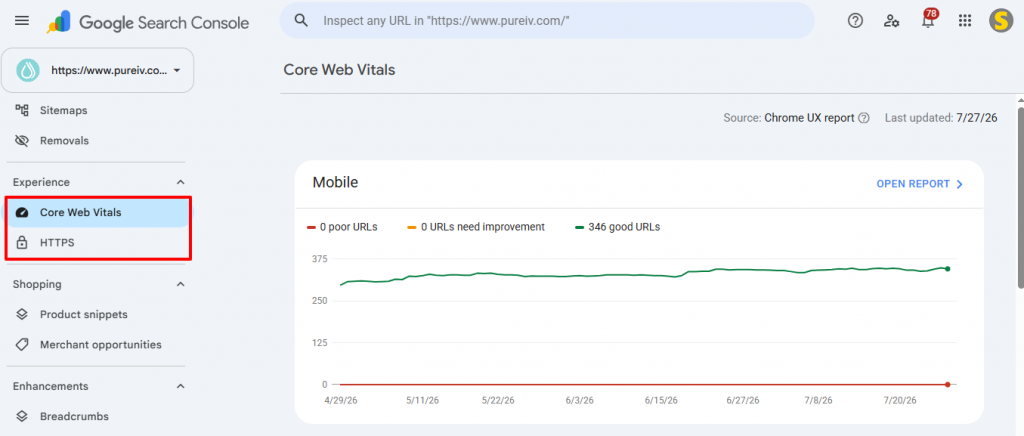
Three field metrics drawn from real Chrome users, not lab tests:
- LCP (Largest Contentful Paint) — loading. Target under 2.5s. See how to fix LCP in Search Console.
- INP (Interaction to Next Paint) — responsiveness. Target under 200ms.
- CLS (Cumulative Layout Shift) — visual stability. Target under 0.1. Both covered in how to fix CLS and INP.
Pages are grouped Good / Needs Improvement / Poor, separately for mobile and desktop. Prioritise mobile.
Two things people get wrong. First, GSC groups similar URLs, so fixing one URL can move the whole group — check the group, not the page. Second, the data is a 28-day rolling average of real users, so a fix deployed today will not show for weeks.
Most failures trace back to images and render-blocking assets. See how to make photos load faster, speed optimization mistakes to avoid, and the background on why Core Web Vitals affect SEO. If the fixes need server-side work, our WordPress speed optimization service handles it end to end.
Note on Mobile Usability: Google retired this report in December 2023, along with the Mobile-Friendly Test and its API. If a guide tells you to check it, that guide is out of date — see the retirement announcement breakdown. Mobile-friendliness still affects rankings, and how Google measures user experience explains what replaced it.
HTTPS
Confirms pages are served securely. If URLs are flagged, check for an expired certificate, unredirected HTTP URLs, mixed content, or an HTTP canonical on an HTTPS page. Our guide to HTTPS not used in Search Console walks through each.
6. Enhancements (Structured Data)
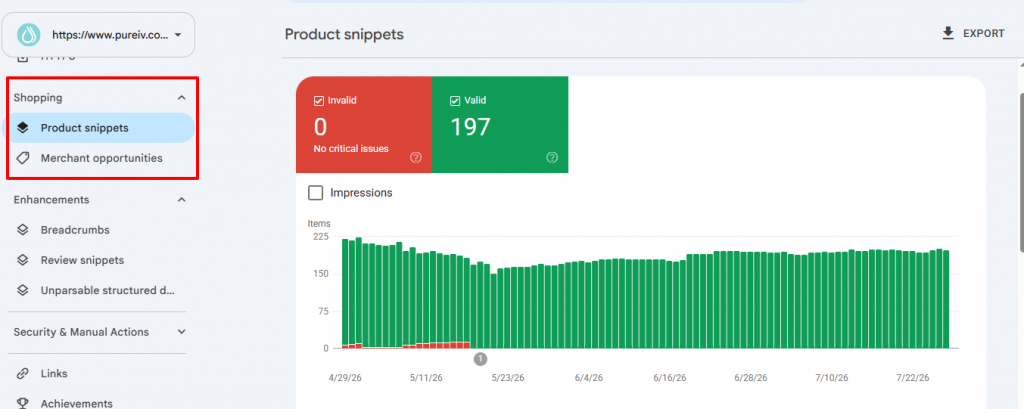
Lists structured-data types Google detected and whether each item is valid, warned, or invalid.
Still worth implementing in 2026:
- Breadcrumbs — BreadcrumbList. Low effort, universally applicable. See when breadcrumbs make sense.
- Product — still one of the highest-impact enhancements for eCommerce. Our eCommerce schema markup guide covers implementation, and the common GSC errors each have fixes: missing field priceValidUntil, missing shippingDetails, missing hasMerchantReturnPolicy, and invalid object type for field brand on Shopify.
- Review snippets — AggregateRating, only on supported page types. See missing field review and aggregateRating, and avoid the trap of displaying copied reviews via widget.
- Article — no visible rich result alone, but it supplies clean authorship and date signals. Pair with author schema.
- Organization — supports entity understanding. See our organization schema markup guide.
- Merchant listings — for eCommerce with Merchant Center. If products are rejected, see resolving Merchant Center product disapproved.
Deprecated — do not build strategy around these:
- FAQ. Deprecated May 2026. Rich results no longer appear for anyone. FAQPage remains valid schema and causes no harm, but it is no longer a SERP lever. Full detail in Google deprecates FAQ rich results.
- HowTo. Rich results dropped in 2023.
- Six niche types removed in September 2025.
What to do with each status: Valid → no action. Warnings → recommended properties missing; adding them improves the appearance. Invalid → required properties missing; these items are not eligible. Fix these first.
For multilingual sites, hreflang implementation is worth auditing at the same time — and Wix users should check the incorrect hreflang tag issue.
7. Security & Manual Actions
Manual actions
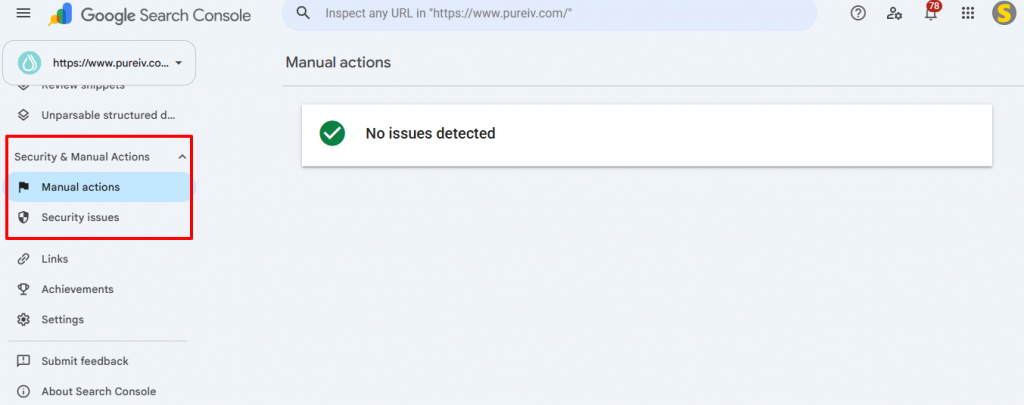
Where Google reports penalties applied by human reviewers. “No issues detected” is the only acceptable state.
Common types: unnatural links to your site, unnatural links from your site, thin content, user-generated spam, cloaking, and structured-data spam.
Fixing one requires genuinely resolving the issue and submitting a reconsideration request documenting what you did. These are read by people, so a vague request wastes weeks. Our full walkthrough is Google manual action penalty: how to identify, fix and recover.
If the action concerns unnatural links, start with how to disavow links and review your acquisition approach — our backlink service and notes on how many backlinks you actually need exist partly because most penalties trace back to volume-first link buying.
Security issues
Flags malware, phishing, harmful downloads, and hacked content. Treat anything here as an emergency — Google shows an interstitial warning and traffic falls to near zero.
- Take the site into maintenance mode if the compromise is active.
- Contact your host; most offer malware remediation.
- Scan and clean with a security tool (Wordfence or Sucuri for WordPress).
- Change every password, rotate API keys, update plugins, themes and core.
- Restore from a known-clean backup if cleaning is not viable.
- Request a review in GSC once you are confident it is clean. A failed review costs another cycle.
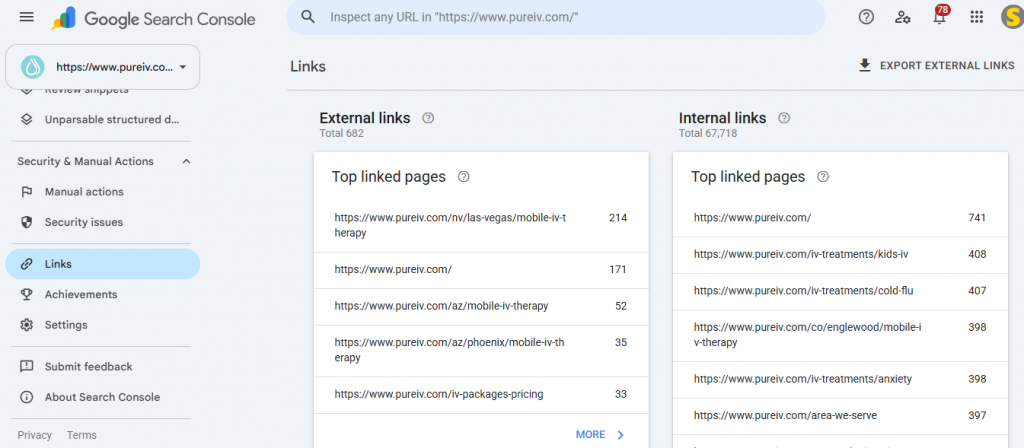
8. Links
Shows internal and external linking from Google’s perspective.
External links: which pages have the most backlinks, which sites link to you most, and common anchor text. Less complete than Ahrefs or Semrush, but it is Google’s own view.
Internal links: which pages receive the most internal links. The more actionable half. Sort ascending — pages at the bottom receive almost no internal authority. If any of them matter, that is a free fix.
Action: find your pages with the most external backlinks, then link from those pages to your priority commercial pages. You are routing acquired authority toward revenue. This is the core of what off-page SEO is meant to achieve — building links and then actually using them.
9. Settings and Tools
Crawl stats
Settings → Crawl stats. Genuinely useful and almost universally ignored. Shows total crawl requests, download size, average response time, and a breakdown by response code, file type, purpose, and Googlebot type.
Watch for a rising average response time (your server is shrinking your effective crawl budget), a spike in 5xx responses, or crawl budget spent on low-value URLs like faceted navigation.
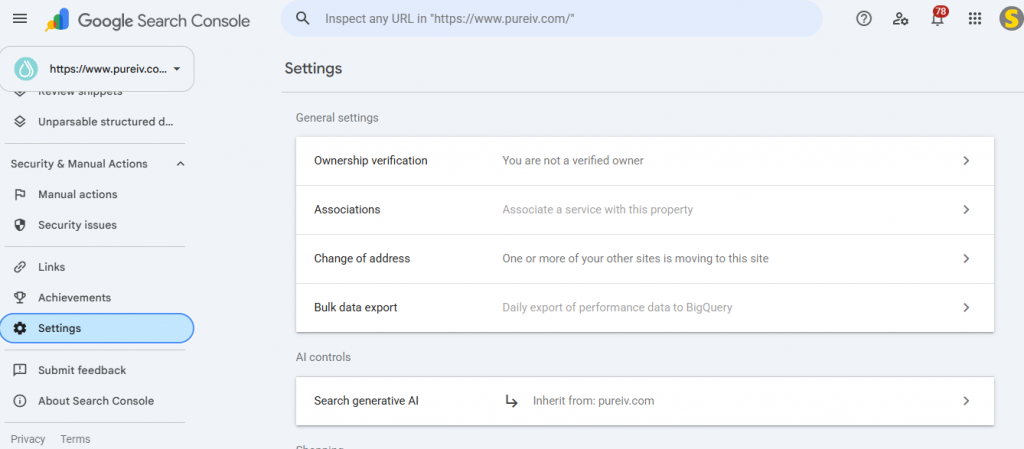
Ownership verification
Keep at least two verification methods active. The most common cause of lost GSC access is deactivating the plugin serving the verification meta tag. A DNS TXT record is the most durable method.
Users and permissions
Owner, Full user, or Restricted user. Review this when contractors or agencies leave. An old agency with Full access can submit sitemaps, request removals, and file reconsideration requests on your behalf.
Change of address
For domain migrations. Requires both properties verified and site-wide 301s already in place. It accelerates signal transfer but does not replace correct redirects.
Associations
Links your property to Google Analytics, Google Ads, YouTube, or Merchant Center. The GA4 association is worth setting up.
Recommendations
Google surfaces opportunities it detected on your property. Treat these as prompts rather than instructions — automated and sometimes generic, but they occasionally catch something you missed.
Search Console Insights
Combines GSC and GA4 into a simplified narrative view. Useful for client-facing summaries; not a replacement for the raw reports.
Bulk data export to BigQuery
Settings → Bulk data export. Sends daily unsampled data to BigQuery, removing the 1,000-row limit and the 16-month retention window. Set this up today — you cannot backfill data you did not export. For programmatic access instead, see configuring the Search Console API.
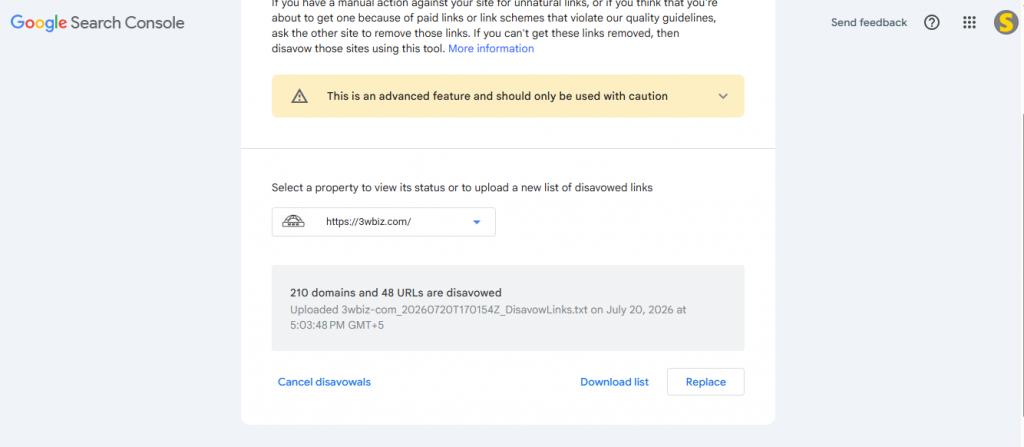
Google Disavow Tool:
The disavow tool lets you tell Google to ignore specific inbound links when evaluating your site. It is technically part of Search Console but not in the sidebar, Google keeps it on a separate URL specifically to discourage casual
use.
Most sites should never touch it. Since Penguin 4.0 and SpamBrain, Google devalues low-quality links algorithmically before they affect rankings. A noisy backlink profile is normal and does not require intervention. Google’s own documentation calls it an advanced feature to be used with caution, and John Mueller’s stated threshold is worth memorising: would the Webspam team likely issue a manual action for these links? If no, you almost certainly do not need
the file.
The “toxic links” score in Semrush or Ahrefs is not a trigger. Those are third-party estimates, not Google signals, and disavowing on the strength of them strips legitimate ranking signals from your site.
The two situations that still justify a disavow file:
- An active manual action for unnatural links. This is the original and still-primary use case. Disavow, then submit your reconsideration request.
- A documentable negative-SEO campaign — a concentrated, obviously scheme-related link pattern you can evidence, where you have strong reason to believe a manual action is imminent.
Outside those two, the tool offers no benefit and can actively hurt you.
How to use it, if you genuinely need to:
- Create a plain
.txtfile, UTF-8 or 7-bit ASCII, one entry per line - Use
domain:example.comto disavow an entire domain, or a full URL for a
single page - Lines starting with
#are comments and are ignored — use them to date the
file and note why each block was added - Upload through the disavow tool page, selecting the correct property
- Processing happens as Google recrawls the listed pages, typically over several
weeks
Three things that catch people out:
- Each upload replaces the previous file entirely. It is not additive. If you upload a new file, it must contain everything you still want disavowed.
- To undo a disavow, upload a file containing only comments, or an empty one.
- Scope follows the property. A file uploaded to a URL-prefix property applies only to that property’s coverage, which is one more reason to run a Domain property.
Google has never committed to keeping the tool indefinitely and has openly discussed removing it, as Bing already did. Build a link profile that does not depend on it. Our step-by-step walkthrough is how to disavow links, and if the underlying problem is acquisition strategy rather than a one-off attack, our backlink service is built around links you never need to disavow.
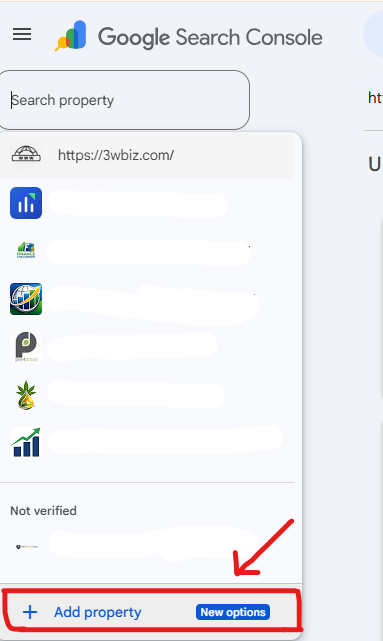
10: Social Media Properties: Social Accounts Inside GSC
In July 2026 Google added a new property type — Platform Properties — letting you verify a social or video account (Instagram, TikTok, X, or YouTube) directly and see how its content performs in Google Search and Discover. It works even without a website, and reports clicks, impressions, queries, CTR and position just like a normal site property. Support started with four platforms; Facebook and LinkedIn are not yet included.
Frequently Asked Questions
Why don’t my GSC clicks match Google Analytics?
They measure different things. GSC counts clicks in Google Search results; GA4 counts sessions that loaded your site and passed consent. A 10–20% gap is expected.
How long does GSC keep my data?
16 months in the interface. For longer history, use the BigQuery bulk export or pull data on a schedule via the Search Console API.
Why did my impressions drop in 2026?
Most likely the correction of Google’s logging bug, which over-reported impressions from May 2025 to April 2026. Clicks were unaffected. There was also a separate drop in September 2025 — see why GSC impressions dropped.
Does requesting indexing help rankings?
No. It requests a crawl. It has no effect on how the page ranks once crawled.
Is there a special schema for AI Mode and AI Overviews?
No. Google’s AI optimisation guide states directly that no special structured data is required. Schema still earns rich results, but it does not make you eligible for AI citation.
Why do I rank on page one but never appear in AI Mode answers?
Usually one of three reasons: the page is blocked from snippets, the answer only renders after JavaScript, or the page covers one keyword narrowly while query fan-out needs a source resolving several related sub-questions. Check eligibility first, then depth.
Should I opt out of AI Overviews and AI Mode?
For most sites, no. Opting out forfeits AI impressions and traffic without improving classic rankings.
Should I remove the FAQ schema now that rich results are gone?
Not necessarily. Google confirmed the markup causes no harm, and other engines and AI crawlers may still use it. Just stop treating it as a CTR tactic.
Domain property or URL-prefix property?
Domain, in almost every case. It consolidates all subdomains and protocols into one view.
How long until a fix shows in GSC?
Days to weeks. URL Inspection reflects changes immediately via Live Test. Indexing reports update within days of a recrawl. Core Web Vitals uses a 28-day field-data window, so allow a month.