
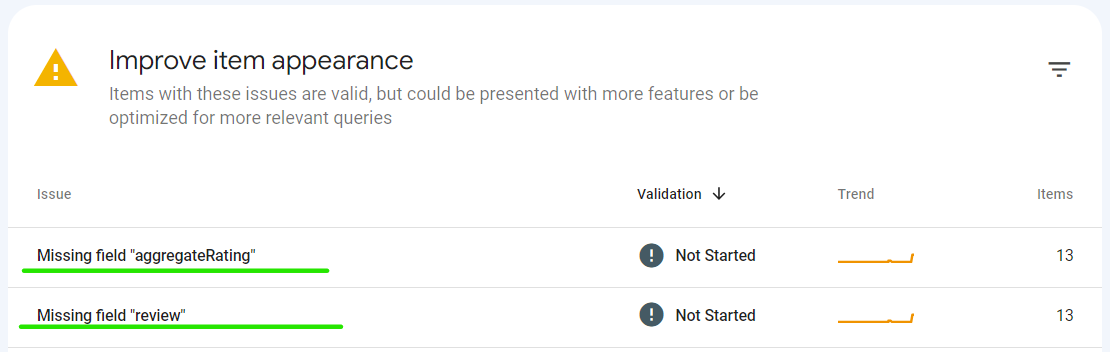
When Google Search Console flags “Missing field aggregateRating” or “Missing field review” under your Product snippets report, it means your product pages have structured data that Google recognizes as Product schema but the aggregateRating and review properties are either absent or incorrectly implemented.
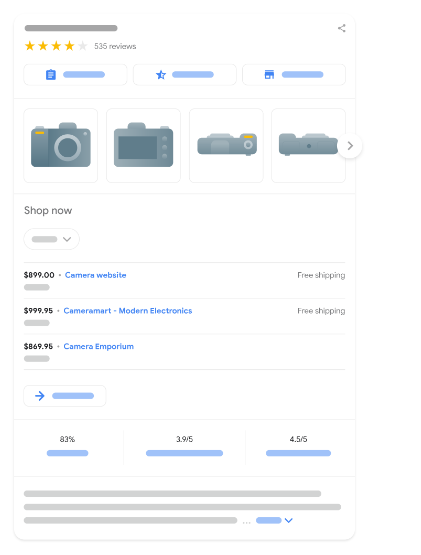
This is not a critical indexing error. Google classifies it as a warning, not an error, which means your pages are still indexed and can still appear in search results. However, without valid rating and review markup, your product listings will never qualify for rich results the star ratings, review counts, and review snippets that appear directly in the search results and significantly boost click-through rates.
This guide walks through exactly why Google flags this, how to fix it on WooCommerce, Shopify, and custom-built sites, and what to do when your products don’t have any reviews yet.
How This Impacts Your SEO and Traffic:
The missing “aggregateRating” and “review” fields can have a negative impact on your SEO in several ways:
Reduced Visibility:
Search engines like Google prioritize rich results with star ratings and snippets of reviews. Without this information, your product page might be less visible in search results, as users are naturally drawn to visually appealing and informative listings.
Lower Click-Through Rate (CTR):
Even if your product page appears in search results, users might be less likely to click on it if they see no star rating or reviews. This is because the absence of these elements can raise concerns about the product’s quality or credibility.
Step-by-Step Guide to Fix “aggregaterating” And Missing field “reviews”
Identify the Affected Products:
Access the “Product snippets” report in GSC to see the list of errors effected pages.
Utilize Validation Tools:
- Use Google’s Rich Result Testing Tool to test your product pages and identify missing fields.
Consult Google’s Documentation:
- Refer to Google’s Structured Data Guidelines for Products for detailed instructions on implementing “Schema”:
How to Fix Missing field “aggregateRating”:
The Missing field “aggregateRating” warning appears when your Product Schema does not include an Aggregate Rating object. This property tells Google the overall rating of a product based on customer reviews.
Option 1: Add Aggregate Rating (Recommended)
If your product has genuine customer reviews, add an aggregateRating object to your Product Schema.
Example:
"aggregateRating": {
  "@type": "AggregateRating",
  "ratingValue": "4.8",
  "reviewCount": "156"
}
Replace the values with your actual product rating and total number of reviews.
Option 2: Remove the Warning When No Reviews Exist
If your store has no customer reviews, you should not add fake ratings just to satisfy Google’s Rich Results Test.
Instead:
- Omit the
aggregateRatingproperty completely. - Also remove the
reviewproperty if no reviews exist. - Keep the rest of your Product Schema valid.
This is Google’s recommended approach and prevents structured data policy violations.
Validate Your Fix
After making changes:
- Clear your website cache.
- Wait for the updated Schema to appear.
- Test the page using Google’s Rich Results Test.
- If the warning is gone, request reindexing in Google Search Console (optional).
Important: Never create fake ratings or review counts simply to remove this warning. Google requires that structured data accurately reflects the content shown to users.
How to Fix Missing field “Reviews”:
The Missing field “review” warning appears when your Product Schema does not include individual customer reviews. The review property allows Google to understand the feedback customers have left for a product and may help qualify it for rich results.
Option 1: Add Reviews (Recommended)
If your product has genuine customer reviews, add one or more Review objects to your Product Schema.
Example:
"review": {
        "@type": "Review",
          "reviewRating": {
            "@type": "Rating",
            "ratingValue": 4,
            "bestRating": 5
          },
Only include reviews that are displayed on the product page and submitted by real customers.
Option 2: Remove the Warning When No Reviews Exist
If your product has no customer reviews, you should not create fake reviews just to remove the warning.
Instead:
- Omit the
reviewproperty completely. - Also omit the
aggregateRatingproperty if no ratings are available. - Ensure the rest of your Product Schema remains valid.
This follows Google’s structured data guidelines and helps avoid manual actions for misleading markup.
Validate Your Fix
After making changes:
- Clear your website cache.
- Wait for the updated Schema to be generated.
- Test the page using Google’s Rich Results Test.
- Confirm the warning has been resolved.
- Optionally request reindexing in Google Search Console.
Important: Never add fake reviews to your structured data. Any reviews included in your Product Schema must accurately represent reviews that are visible to users on the product page.
Choose the Right Fix Method for Your Platform
If you’re on WordPress/WooCommerce:
Most SEO plugins like Yoast SEO or RankMath auto-generate product schema, but they won’t add aggregateRating or review unless your product actually has ratings enabled. Go to WooCommerce → Settings → Products and make sure “Enable star rating on reviews” is turned on. Once customers leave ratings, the schema fields populate automatically.
If you’re on Shopify:
Open your theme code editor, go to theme.liquid or your product template file, and check whether your review app (e.g., Judge.me, Loox, Yotpo) is injecting the schema automatically. Most review apps have a setting like “Enable structured data” turn this on rather than hardcoding it manually.
If you’re on a custom-built site:
You’ll need to manually insert the JSON-LD script in the <head> section of your product page template, or right before the closing </body> tag.
Here’s an example of a product page with aggregateRating and Reviews. This example would result in a shipping rate of $2.49 for all users.
*/ This is complete Product Snippet Schema included "aggregateRating and Reviews" in offer Section, aggregateRating and Reviews Section is highlight in this schema example. /*

<script type="application/ld+json">
    {
      "@context": "https://schema.org/",
      "@type": "Product",
      "sku": "trinket-12345",
      "gtin14": "12345678901234",
      "image": [
        "https://example.com/photos/16x9/trinket.jpg"
      ],
      "name": "Nice trinket",
      "description": "Trinket with clean lines",
      "brand": {
        "@type": "Brand",
        "name": "MyBrand"
      },
      "offers": {
        "@type": "Offer",
        "url": "https://www.example.com/trinket_offer",
        "itemCondition": "https://schema.org/NewCondition",
        "availability": "https://schema.org/InStock",
        "price": 39.99,
        "priceCurrency": "USD",
        "priceValidUntil": "2024-01-10",
        "shippingDetails": {
          "@type": "OfferShippingDetails",
          "shippingRate": {
            "@type": "MonetaryAmount",
            "value": 2.49,
            "currency": "USD"
          },
          "shippingDestination": {
            "@type": "DefinedRegion",
            "addressCountry": "US"
          },
          "deliveryTime": {
            "@type": "ShippingDeliveryTime",
            "handlingTime": {
              "@type": "QuantitativeValue",
              "minValue": 0,
              "maxValue": 1,
              "unitCode": "DAY"
            },
            "transitTime": {
              "@type": "QuantitativeValue",
              "minValue": 1,
              "maxValue": 5,
              "unitCode": "DAY"
            }
          }
        }
      },
      "review": {
        "@type": "Review",
          "reviewRating": {
            "@type": "Rating",
            "ratingValue": 4,
            "bestRating": 5
          },
          "author": {
            "@type": "Person",
            "name": "Fred Benson"
          }
        },
        "aggregateRating": {
          "@type": "AggregateRating",
          "ratingValue": 4.4,
          "reviewCount": 89
        }
      }
    </script>
Important: Only use real ratings and reviews collected from actual customers. Google’s guidelines strictly prohibit self-generated or fabricated review data sites caught doing this risk manual actions and loss of rich result eligibility altogether.
Validate Your Fix:
After updating the schema, run the page through Google’s Rich Results Test. Look specifically for:
- No red “Error” flags under the Product section
aggregateRatingandreviewappearing under “Detected structured data”- No warnings about missing required fields like
ratingValueorreviewCount
Request Re-Indexing in GSC:
Once validated, go to GSC → URL Inspection, paste the affected URL, and click Request Indexing. This typically takes anywhere from a few days for Google to re-crawl and update the Product snippets report.
For a deeper understanding of how different schema types work together on e-commerce sites, see our complete guide to schema markup for e-commerce SEO.
What if your product has no reviews yet?
Do not hardcode dummy review data or static schema. Adding fake or hardcoded reviews to force rich snippets violates Google’s Structured Data Guidelines and can result in a manual penalty.
The Right Approach (Dynamic Loading): Instead of manually pasting review code, use an automated dynamic script or an SEO plugin (like Rank Math, Yoast, or WooCommerce’s built-in review system).
When there are 0 reviews: The script automatically omits the aggregateRating and review properties from the schema markup. This prevents Google from reporting invalid review data, although the Rich Results Test may still report informational messages or warnings because no review information is available.
When a customer leaves a review: The system automatically fetches the new rating/review data and populates it directly into your JSON-LD Schema without any manual code updates required.
Conclusion
Summarize your journey in resolving the “Missing field aggregateRating and Reviews” issue. Reiterate the importance of proactive troubleshooting for a seamless GSC experience. Get ready to conquer the “How to fix Missing field aggregateRating and Reviews in GSC issue?” with newfound knowledge and actionable insights. Implement these strategies to enhance your website’s performance and user trust.
FAQ’s
- What causes the “Missing field aggregateRating and Reviews” issue? Uncover the root causes behind this problem, from coding errors to indexing issues.
- Can I fix this problem without technical expertise? Explore user-friendly solutions suitable for individuals without a technical background.
- How long does it take for changes to reflect in GSC after fixing the issue? Understand the timeline for updates and ensure the effectiveness of your solutions.
- Are there alternative tools to GSC for monitoring aggregateRating and Reviews? Explore alternative tools and platforms for comprehensive monitoring and analysis.
- What role do third-party plugins play in addressing this issue? Assess the compatibility and effectiveness of third-party plugins in resolving the problem.
- How frequently should I check for aggregateRating and Reviews discrepancies in GSC? Establish a routine for monitoring and proactively addressing potential issues.