
When it comes to optimizing websites for maximum visibility, one of the most overlooked technical SEO pitfalls is the “canonical points to redirect” issue. While it may seem like a minor technical inconsistency, this single error can cause search engines to ignore your canonical instructions, waste crawl budget, and dilute page authority.
Having fixed this problem across multiple sites, from eCommerce to SaaS and blogs, I can confidently say: if you’re not handling canonicals properly, you’re leaving organic traffic on the table.
1. What is the “Canonical Points to Redirect” Issue?
A canonical tag is used to tell search engines which version of a URL is the “master” or preferred version to be indexed. Ideally, it should point directly to a clean, indexable URL that returns an HTTP 200 status code.
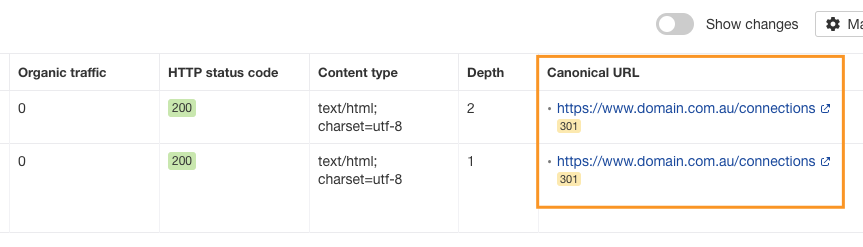
However, if that canonical tag points to a URL that itself redirects (via 301 or 302), this causes ambiguity.
For Example:
<link rel="canonical" href="https://www.domain.com.au/connections" />If https://www.domain.com.au/connections redirects to https://www.domain.com.au/connections/, search engines must process the redirect chain before interpreting the canonical directive. This often leads to them ignoring the tag entirely.
Why it matters:
- Search engines don’t follow multiple redirect hops for canonical tags.
- They prefer clean, direct signals with no detours.
- Conflicting or unclear canonical paths can lead to indexing the wrong page or none at all.
2. Why This Issue Hurts Your SEO Performance
Here’s why allowing canonical tags to point to redirecting URLs can be quietly sabotaging your SEO:
✅ Indexing Confusion
Redirects muddy the waters for search engines. Instead of knowing exactly which page to index, Google may choose a different page entirely or ignore your canonical tag.
✅ Dilution of Link Equity
When canonical URLs redirect, some link equity may be lost in the chain. That means backlinks pointing to the original page may not fully benefit the final destination.
✅ Wasted Crawl Budget
Googlebot has a limited crawl budget. If it wastes time chasing redirects in canonical tags, it may not get to your important pages as frequently.
✅ Reduced Trust in Canonical Signals
When search engines detect conflicting or invalid canonical setups, they may begin to disregard your canonical directives altogether. That’s a dangerous scenario for large or multi-version websites.
3. How to Detect This Problem on Your Site
Spotting the issue early can prevent long-term indexing and ranking problems. Here are the best ways to identify it:
🔍 Use SEO Audit Tools
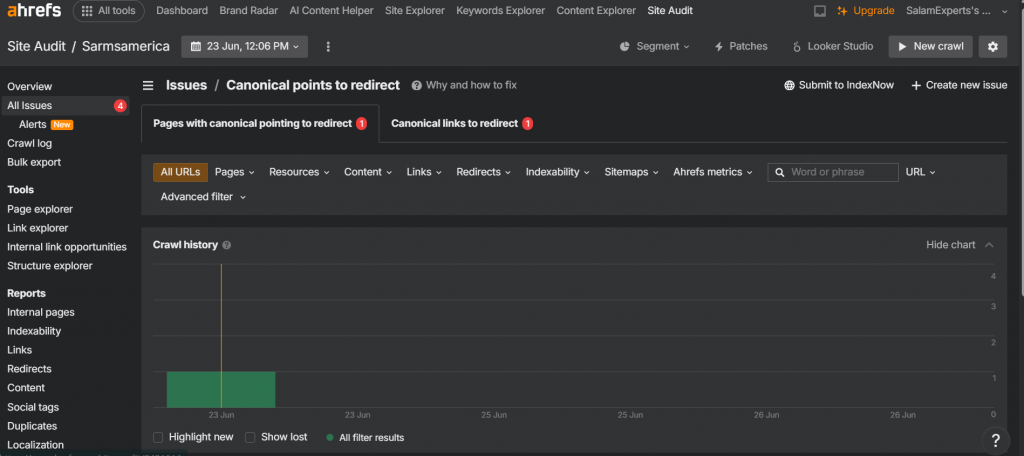
- Ahrefs Site Audit: It flags this issue under the “canonical issues” section.
- Screaming Frog: Crawl your site and enable the “canonical” column in the export.
- Sitebulb: Provides a visual map of canonical relationships and redirect chains.
🔎 Manual Source Check
- Open the page in your browser.
- Right-click and select View Page Source.
- Find the
<link rel="canonical" href="...">tag. - Copy and paste the URL into your browser or a tool like httpstatus.io to see if it redirects.
📊 Google Search Console
Go to the Pages report under Indexing. Look for inconsistencies where the “User-declared canonical” differs from the “Google-selected canonical.”
Step-by-Step Solutions to Fix Canonical Points to redirect
Here’s the exact process I follow when correcting this issue on client websites:
✅ Step 1: Identify All Affected Pages
Use Screaming Frog or Ahrefs to extract a list of pages where the canonical URL is redirecting. Export this for bulk review.
✅ Step 2: Find the Final Destination
Use a redirect checker to see where each canonical URL ends up. You need the final URL after any redirects.
✅ Step 3: Update the Canonical Tags
Replace the redirecting canonical with the final destination. Update your code or CMS settings accordingly.
Example fix:
<link rel="canonical" href="https://example.com/page" />(where this redirects to https://www.example.com/page/)
After:
<link rel="canonical" href="https://www.example.com/page/" />✅ Step 4: Remove Unnecessary Redirect Chains
If possible, clean up long redirect chains by setting permanent 301s directly to the final URL. Avoid multiple hops.
✅ Step 5: Re-crawl and Validate
After updating, run another site audit and verify that:
Pages now return a 200 HTTP status.
Canonical URLs are pointing directly.
No 3xx responses exist in the canonical URL chain.
5. SEO Checklist to Prevent Canonical Redirect Errors
| ✅ Task | Description |
|---|---|
| Use direct URLs in canonical tags | Always point to the final, non-redirecting page |
| Set self-referencing canonicals | Every page should declare itself as canonical unless consolidated |
| Use 301 redirects sparingly | Avoid redirect chains or loops |
| Automate redirect checks | Use scheduled site audits or monitoring tools |
| Monitor Search Console alerts | Google will flag mismatched canonicals if detected |
| Include canonical checks in QA workflow | Developers and SEOs should test canonical tags before site launches |
If you’re dealing with canonical redirect issues right now, fix them ASAP. In my experience, resolving this one issue has helped pages recover rankings, eliminate duplicate indexing problems, and improve crawl efficiency by as much as 30%.
See Google’s Recommendations on Canonicals.
Read more about Ahrefs Site Audit Issue.