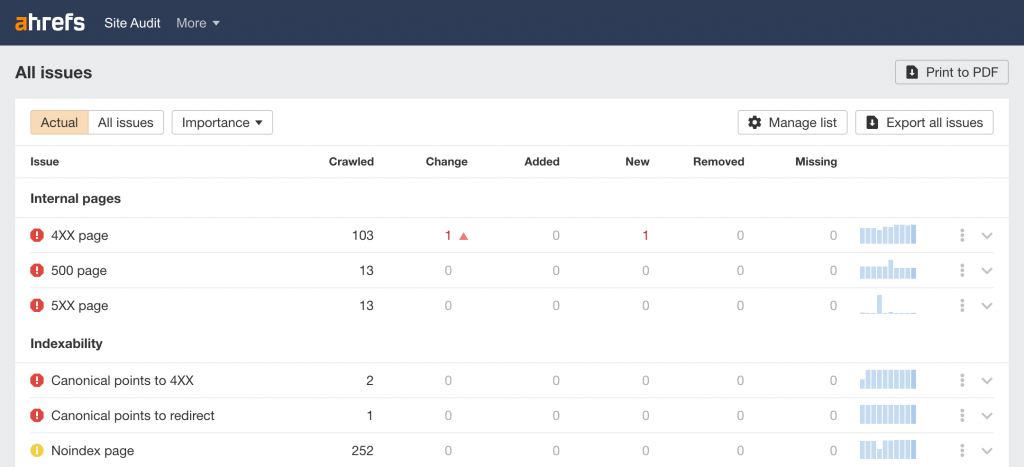
Running a Site Audit in Ahrefs can reveal critical server-side problems, and one of the standout issues is the “500/5XX page” error . This flags internal URLs returning a 500 Internal Server Error HTTP status code, indicating the server couldn’t process the request. It’s part of the broader 5xx family of server errors (like 503 Service Unavailable), which Ahrefs may report separately as “5xx page” errors. These are server-side issues (unlike 4xx client errors), meaning the problem lies with your site’s backend and often requires expert technical handling through reliable web development services
In Ahrefs, this error appears prominently because unresolved server errors can tank your SEO: search engines like Google may deprioritize crawling your site, leading to indexing issues, lost rankings, and poor user experience. If you’re seeing this in your Ahrefs report, it’s a red flag for potential downtime or misconfigurations that affect accessibility.
Google Search Console reports Server errors (5XX)
This guide draws from Ahrefs’ best practices to explain the error in detail, how to spot it, and how to resolve it efficiently, ensuring your site stays healthy and crawlable.
What Is a 500 / 5XX Page Error in Ahrefs? 500 Page Error A 500 page error in Ahrefs reports any internal page URL returning an HTTP 500 response code , also known as a Internal Server Error .
This means the server can’t complete the request for that page. It doesn’t tell you exactly why , just that something went wrong when the server tried to deliver it.
5XX Page Error A 5XX page error is a broader category. It includes all status codes in the 500–599 range , all of which signal various types of server failure.
Common 5XX codes include:
500 – Internal Server Error
503 – Service Unavailable
Why These Errors Matter Both 500 and 5XX errors are important to fix because:
Users can’t access the page – leads to a poor user experience.
Search engines can’t crawl or index the pages – potential loss in rankings and visibility.
Crawlers leave the request early – reducing your site’s crawlability.
If a page repeatedly throws 5XX errors, Google and other search engines may stop trying to index it, meaning the content won’t show in search results.
Common Causes of 500 & 5XX Errors These server errors generally come from issues on the server side , not the user’s browser. Typical causes include:
Server overload or maintenance (often shows as 503)
Server misconfiguration or incorrect settings
Faulty plugins/scripts in CMS (like WordPress)
Corrupted .htaccess file
Low PHP memory limits
Firewall or security tools blocking crawlers
High crawl speed set in Ahrefs project settings (leading to throttling)
Step-by-Step: How to Fix 500 / 5XX Errors 1. Identify Affected URLs First, check the list of pages Ahrefs reports under the 500/5XX issue in your Site Audit.
2. Manually Test the Page Visit the URL in your browser to see if the error still appears.
3. Review Server Logs Look at your server’s error logs, these often show exactly why the page returned a 5XX error. This step often reveals:
database connection issues
4. Fix Server-Side Issues Depending on what you find:
Increase PHP memory limits
Repair or regenerate .htaccess
Disable or fix problematic plugins
Resolve permission issues
Check and optimize database connections
5. Adjust Crawl Speed If Ahrefs is making too many simultaneous requests (and your server can’t handle it):
Lower the crawling speed in your Site Audit settings
Then re-run the audit to check if the issue clears up
6. Contact Your Hosting Provider or Developer If the error persists after basic fixes, you may need a deeper server configuration review.
Checklist: Quick Fix Reference
Why You Shouldn’t Ignore These Errors Ignoring 500 or 5XX issues will:
Search engines always prefer reliable, fast, fully accessible content , server errors signal instability.
Conclusion In Ahrefs Site Audit, 500 and 5XX page errors are serious technical SEO issues caused by server-side problems. They stop both users and search bots from accessing your content, hurting your SEO performance.