Modified Date: January 26, 2026
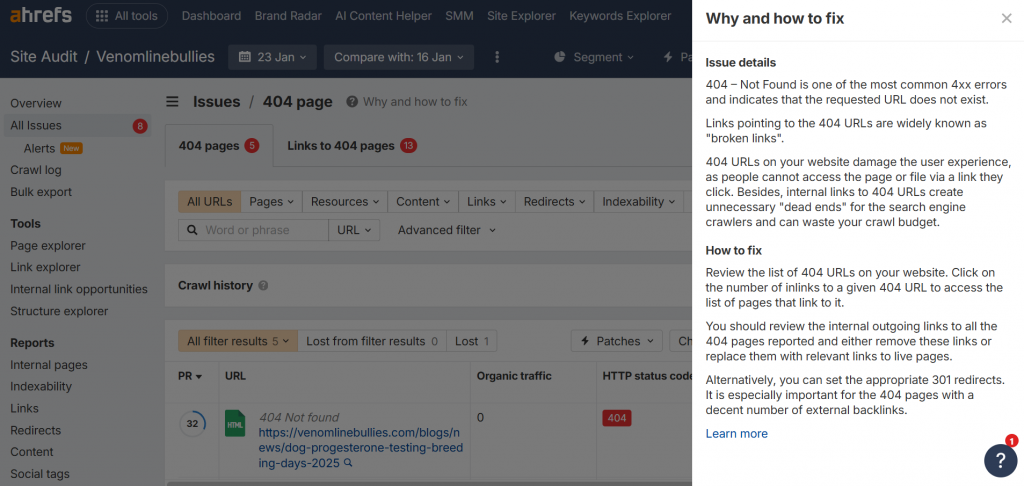
404 errors are a natural part of website changes, but unmanaged 404s can quietly damage your SEO performance. In Ahrefs Site Audit, a 404 error indicates that a crawled URL no longer exists and returns a “Page Not Found” response. While removed pages are not always a problem, broken internal links pointing to those URLs can negatively impact crawl efficiency, user experience, and link equity. — which is why many businesses rely on professional SEO services
👉 You can also compare this with how Google Search Console reports Not Found (404) errors
In this guide, you’ll learn how to identify these broken links in ahrefs Site Audit and fix them using three simple strategies: replace, remove, or restore.
What Does “404 Page” Error Mean in Ahrefs Site Audit?
In Ahrefs Site Audit, the “404 page” issue lists all internal URLs that returned a 404 (Not Found) response when Ahrefs’ crawler visited them. These are “dead pages” content that has been deleted, moved without redirection, or never existed.
Key points from Ahrefs’ reporting:
It’s a client-side 4xx error (the server says: “I can’t find what you’re asking for”).
Ahrefs distinguishes this from soft 404s (pages that return 200 OK but show “not found” content).
It only includes internal pages discovered during the crawl (not external 404s unless linked internally).
Why does Ahrefs flag this so prominently? Because 404s hurt:
User experience visitors bounce when hitting broken links.SEO search engines waste resources on non-existent pages.Link equity backlinks to 404 pages pass no value.
Google has stated that occasional 404s don’t harm rankings much, but many unresolved ones (especially with traffic or links) can signal poor site maintenance.
How to Find 404 Page Errors in Ahrefs Site Audit
Log in to Ahrefs → Go to Site Audit → Select your project.
Head to the Issues dashboard or Pages report → Filter for Error status.
Look for the “404 page” issue (or search “404” in the issues list).
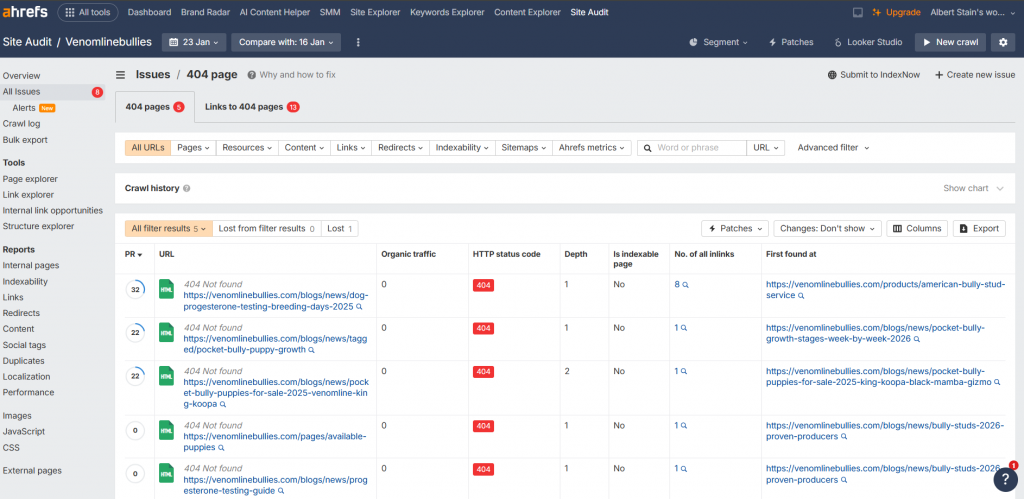
Click into it to see the full table of affected URLs.
Important columns in the Ahrefs table:
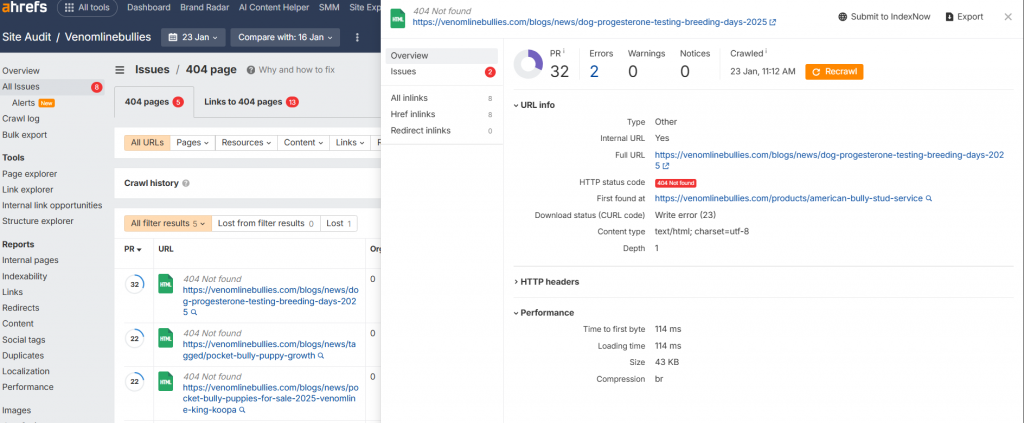
URL the dead page.No. of inlinks how many internal pages link to this 404 (critical for prioritization).No. of backlinks add this column via Columns > Backlinks to see external link value.Status code confirms 404.Last crawl date when Ahrefs last checked.
Click the No. of inlinks number to instantly see which pages are linking to the dead URL, this is gold for quick fixes.
For deeper analysis:
Copy any 404 URL → Paste into Site Explorer → Check the Backlinks report to evaluate lost link value.
How to Fix 404 Page Errors in Ahrefs (Step-by-Step)
Prioritize fixes based on data: Focus first on 404s with high inlinks or backlinks , then lower-value ones.
Step 1: Handle High-Value 404 Pages (with Backlinks or Traffic)
Set up 301 redirects Permanent redirect to the most relevant live page.
Best for pages with decent backlinks or past traffic.
Use 301 (not 302) to pass most SEO value.
Example: Old blog post /old-guide → redirect to updated /new-guide.
In .htaccess (Apache): Redirect 301 /old-url https://yoursite.com/new-url
WordPress: Use Redirection plugin or Yoast SEO.
Alternative : If no good match, use 410 Gone status (tells Google the page is permanently deleted no need to keep crawling).
Step 2: Fix Internal Links Pointing to 404s
From the inlinks list in Ahrefs, visit each linking page and update or remove the broken link. Replacing outdated URLs with relevant live pages is a core part of on-page SEO optimization
From the inlinks list in Ahrefs, visit each linking page.
Update or remove the broken link:
Replace with a link to a similar live page.
Or remove entirely if irrelevant.
Pro tip: Use Ahrefs Content Explorer or bulk edit tools in your CMS to speed this up.
Step 3: Create or Improve Your Custom 404 Page
Don’t leave the default server 404.
Build a branded, helpful custom page that still returns true 404 status (not 200 avoids soft 404s).
Include:
Friendly message: “Sorry, this page doesn’t exist!”
Site search bar.
Links to homepage, categories, popular posts.
Contact form or sitemap link.
In WordPress: Edit theme’s 404.php file.
This keeps users on-site longer and reduces bounce rate.
Step 4: Re-Crawl and Verify Fixes in Ahrefs
After changes, hit Re-crawl in Site Audit (or wait for next scheduled crawl).
Check if the 404 issue count drops and status changes to 200 OK (for redirects) or stays resolved.
Step 5: Prevent Future 404 Errors
Always 301 redirect when deleting/moving pages.
Maintain clean URL structure (avoid frequent changes).
Run Site Audit monthly and set up issue alerts .
Monitor Google Search Console Coverage report for overlapping 404s.
By systematically clearing 404s in Ahrefs, you’ll improve your site’s health score, recover lost link equity, and provide a better experience for both users and search engines.
Have you run into specific 404s in your Ahrefs audit? Share the details and I can suggest targeted fixes!
Best Practices for SEO and User Experience
Monitor regularly : Set up alerts in Ahrefs or Google Analytics for spikes in 404s.Mobile-friendly 404s : Ensure your error page works on all devices.Track impact : After fixes, watch for improvements in traffic and rankings.
By addressing 404 errors promptly, you’ll boost your site’s credibility and SEO health. If you’re seeing these in Ahrefs, start with the highest-traffic broken pages for quick wins.
If you have more questions or need help with specific tools, let me know!